
Download Fever Tracker APK – fever tracker, fever tracking, fever monitoring, temperature tracking, symptom tracker, health app, temperature monitor, fever app, symptom tracking, health monitoring
Overview
Fever Tracker is a specialized Android application designed to assist users in monitoring fever and associated symptoms. Developed by medical professionals, the app aims to provide a reliable, user-friendly tool for tracking temperature changes over time. It is particularly suited for individuals managing illness at home, as well as families seeking a centralized way to monitor multiple users’ health status.
The app supports both Celsius and Fahrenheit units, offering flexibility for users across different regions. It allows tracking of key data points such as the onset time of fever, peak temperature, and the last medication dose administered. These details can be crucial for assessing illness progression and making informed decisions about medical care.
The app is categorized under Lifestyle with a focus on Health & Fitness, indicating its role as a personal wellness tool. It is available at no cost on the Google Play Store, making it accessible to a broad audience. Real-world use cases include monitoring children during viral infections, tracking recovery after illness, and sharing data with healthcare providers during consultations.
The developer did not provide additional details about the app’s technical architecture or backend systems.
Key Features & Capabilities
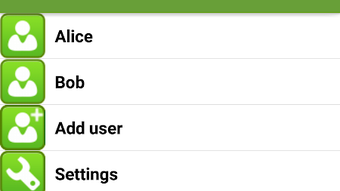
- Multi-User Support – The app enables tracking for multiple individuals, making it ideal for families managing the health of several members simultaneously.
- Temperature and Symptom Logging – Users can record fever onset time, peak temperature, and medication history for accurate health monitoring.
- Unit Flexibility – Supports both Celsius and Fahrenheit, allowing users to select their preferred measurement system.
- Data Sharing Options – Tracked health data can be exported as images or text for sharing with family members or healthcare professionals.
- Simple, Intuitive Interface – Designed for ease of use, minimizing the learning curve for users of all ages.
These features are especially valuable during illness outbreaks or when managing chronic conditions that involve temperature fluctuations. For example, a parent can log their child’s fever patterns and share the summary with a doctor before an appointment. The ability to document medication timing may also help prevent overdosing or missed doses. The app’s design prioritizes clarity and accessibility, ensuring that critical health data is recorded consistently. The developer did not specify advanced analytics or automated alerts, so functionality remains focused on manual input and data export.
User Interface, Workflow & Performance
The user interface of Fever Tracker is structured around simplicity and clarity, with a clean layout that emphasizes essential data entry fields. Navigation is straightforward, allowing users to quickly access the main tracking screen, view historical entries, and export data. The workflow is linear: users input temperature readings, note the time of onset, record medication details, and save the entry.
This streamlined process reduces cognitive load, particularly when users are unwell. The app’s performance is expected to be efficient given its modest size of 12.4 MB, though exact resource usage details were not specified. The developer did not provide information on background processes, battery impact, or CPU behavior.
Stability is assumed to be consistent with typical Android applications of similar scope, but no formal testing data was shared. The app does not require an internet connection for core functionality, enabling use in offline scenarios. Performance observations are based on general software behavior patterns.
Compatibility & System Requirements
Fever Tracker is designed for Android operating systems, with the latest version being 1.0.5. The app has a file size of 12.4 MB, which is relatively lightweight and suitable for devices with limited storage. The developer did not specify exact system requirements, including minimum Android version or hardware specifications such as RAM or processor type.
Compatibility information was partially provided, indicating that the app is built for Android devices. No details were shared about support for tablets, wearables, or other platforms. Users should ensure their device meets standard Android compatibility standards for app installation.
The app is available exclusively through the Google Play Store, and no alternative distribution channels were mentioned. The release date of May 2024 indicates that this is a recently launched application.
Pros and Cons
Pros
- Developed by medical professionals, enhancing credibility in health tracking.
- Free to download and use, with no in-app purchases or subscriptions.
- Supports multiple users, ideal for family health monitoring.
- Simple interface with minimal learning curve.
- Offers data export via image or text for sharing with doctors.
Cons
- No automated alerts or reminders for medication or temperature checks.
- Exact system requirements were not listed.
- Limited to Android platform; no support for iOS or desktop systems.
- Does not include advanced analytics or trend visualization.
- Relies on manual input, which may lead to inconsistent data if not used regularly.
FAQ Section
Is Fever Tracker available for iOS devices?
Fever Tracker is currently designed for Android operating systems. The developer did not indicate plans for an iOS version.
Can I use Fever Tracker without an internet connection?
Yes, the app functions fully offline. Core features such as data entry, storage, and export are available without requiring an internet connection.
Is the app safe to use for medical purposes?
Fever Tracker is intended as a personal health monitoring tool. While developed by medical doctors, it is not a substitute for professional medical advice or diagnosis.
How often should I update the app?
Users are encouraged to keep the app updated to the latest version (1.0.5) for optimal performance and security. Updates are available through the Google Play Store.
What type of license does Fever Tracker use?
The app is distributed as free software under a standard end-user license agreement. It is available at no cost with no restrictions on personal use.
Final Thoughts
Fever Tracker stands out as a practical, no-frills solution for individuals and families managing fever-related health concerns. Its medical-grade development background lends it credibility, while its free model ensures broad accessibility. The app’s focus on core functionality—temperature tracking, symptom logging, and data sharing—makes it effective for daily use.
While it lacks advanced features like automated alerts or visual trend analysis, its simplicity is a strength for users who prefer straightforward tools. It is especially beneficial for caregivers monitoring children or elderly family members. The absence of system requirements and platform limitations is a notable constraint, but the app’s lightweight design and offline capability enhance its usability.
For those seeking a reliable, free fever tracking tool on Android, Fever Tracker delivers on its promise. Download Fever Tracker now.







